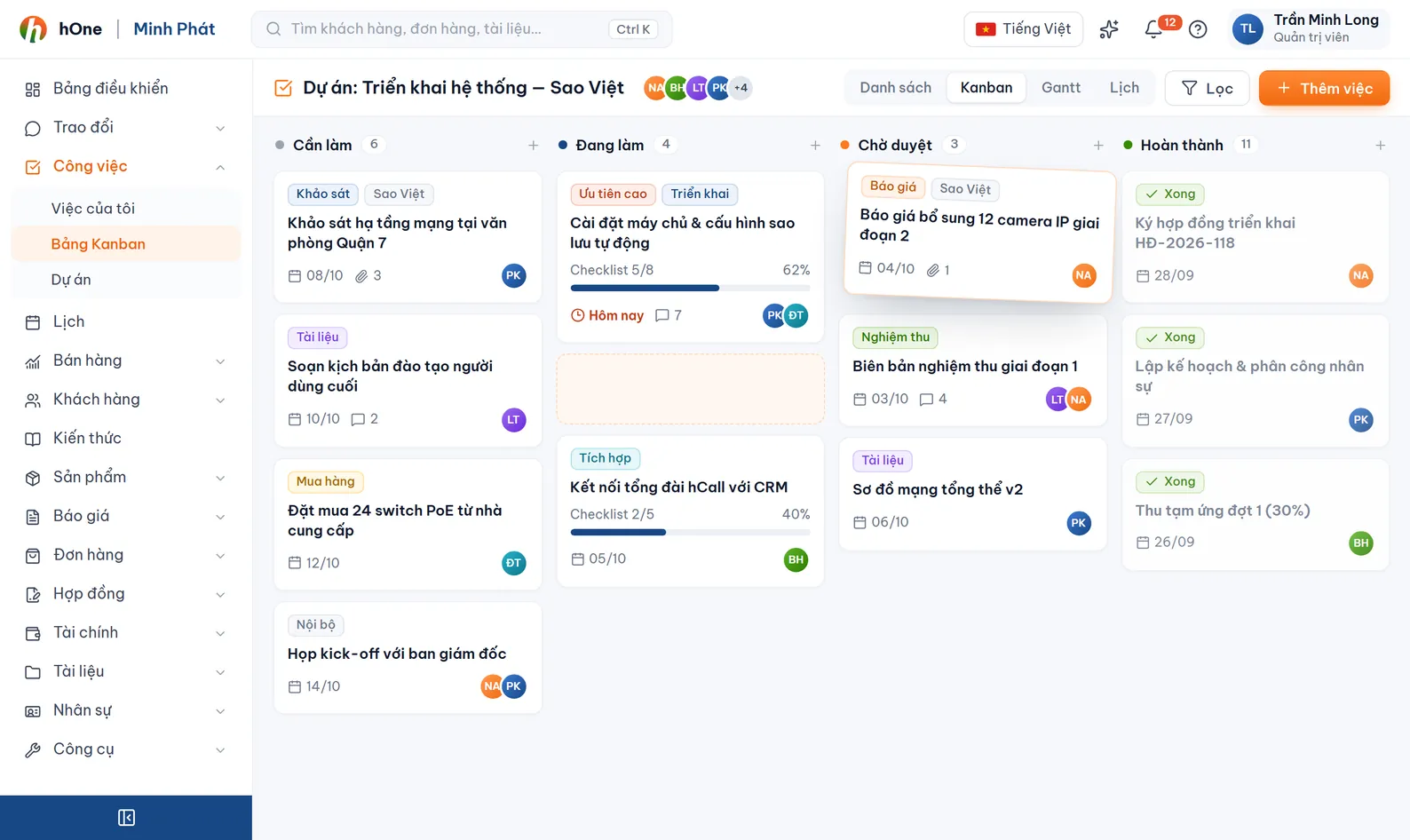
Drag-and-drop Kanban board
Each workspace has its own status columns: add, rename, and flag columns as Review, Completed or Cancelled. Drag cards between columns and split rows by assignee or priority.


Assign work, track deadlines, review results and score KPI points inside hOne. Every task can be linked to a customer, contract, order or conversation, so nobody has to ask who is doing what.
In many 20-person companies, work is handed out over Zalo, by word of mouth or in a notebook. Nobody reminds you at the deadline, nobody knows who signs off, and at month end it is hard to say who did more.
hOne groups tasks into workspaces, each with its own status columns. View them as a Kanban board, a list, a daily or weekly log, or a KPI score board. Projects bundle tasks with phases, members, handover items and payments.
Each workspace has its own status columns: add, rename, and flag columns as Review, Completed or Cancelled. Drag cards between columns and split rows by assignee or priority.
Pick My tasks, Assigned by me, Overdue, Due this week, Waiting for my review or Unassigned. Type a title and press Enter to add a task at once.
Assignees, a reviewer, due date with time, checklist, subtasks, comments with @mentions, attachments, a timer and a change history.
Recurring tasks by day, week, month or year create new tasks on their own. hOne reminds you when the start time nears, 1 day and 1 hour before the deadline, and when a task is overdue.
The reviewer picks Excellent, Pass, Send back for rework or Fail, and rates 1-5 stars on the criteria the workspace defines. The assignee can appeal once.
The KPI tab sums up per employee: results by count, bonus points, penalty points and on-time %. Employees see only their own score. Export to Excel.
Link a task to a customer, conversation, contract, order, quotation or payment voucher. Turn on Auto-create tasks per document so every contract, quotation and order gets one shared task.
A project has a customer, contract, budget, phases, members, handover items and billing. Enable the Client Portal so the customer can follow progress and sign off deliverables.
An admin creates a company or personal workspace, adds members and sets the status columns. The workspace Review & KPI section sets the star criteria and the late penalty.
Click Create task (Ctrl + Enter saves), or create one from a customer, contract or conversation. Choose assignees, reviewer, due date, priority and checklist.
Each person opens My tasks; managers watch Overdue, Unassigned and Waiting for my review. The Daily log tab shows tasks by day or week with estimated and actual hours.
The reviewer settles the result and KPI points are recorded for each assignee. At period end, use the KPI tab or reports so bonuses and penalties rest on numbers.
Demo Store gets a request for an installation quote from Company ABC. Lan assigns the work and reviews it; Minh does it.
Visibility depends on the workspace and each user's permissions. For KPI points, employees see only their own, department heads see their department, and users with the view-all permission see the whole company.
hOne checks every 5 minutes and reminds you when the start time nears, when it has passed but the task is not in progress, 1 day and 1 hour before the deadline, and when it is overdue. Each reminder type is sent at most once a day per task.
Yes. Start the timer on the task, and the Daily log tab shows tasks by day or week with estimated and actual hours.
By default yes, so small companies are not blocked. A workspace can switch on "Do not let assignees review their own tasks"; administrators can always review.
Enable the Client Portal on the project to get a link. The customer enters an email, receives a verification code, then sees progress, phases and documents, and approves or rejects each handover item with a note. Internal tabs such as billing or timesheet are not shown.