List and saved views
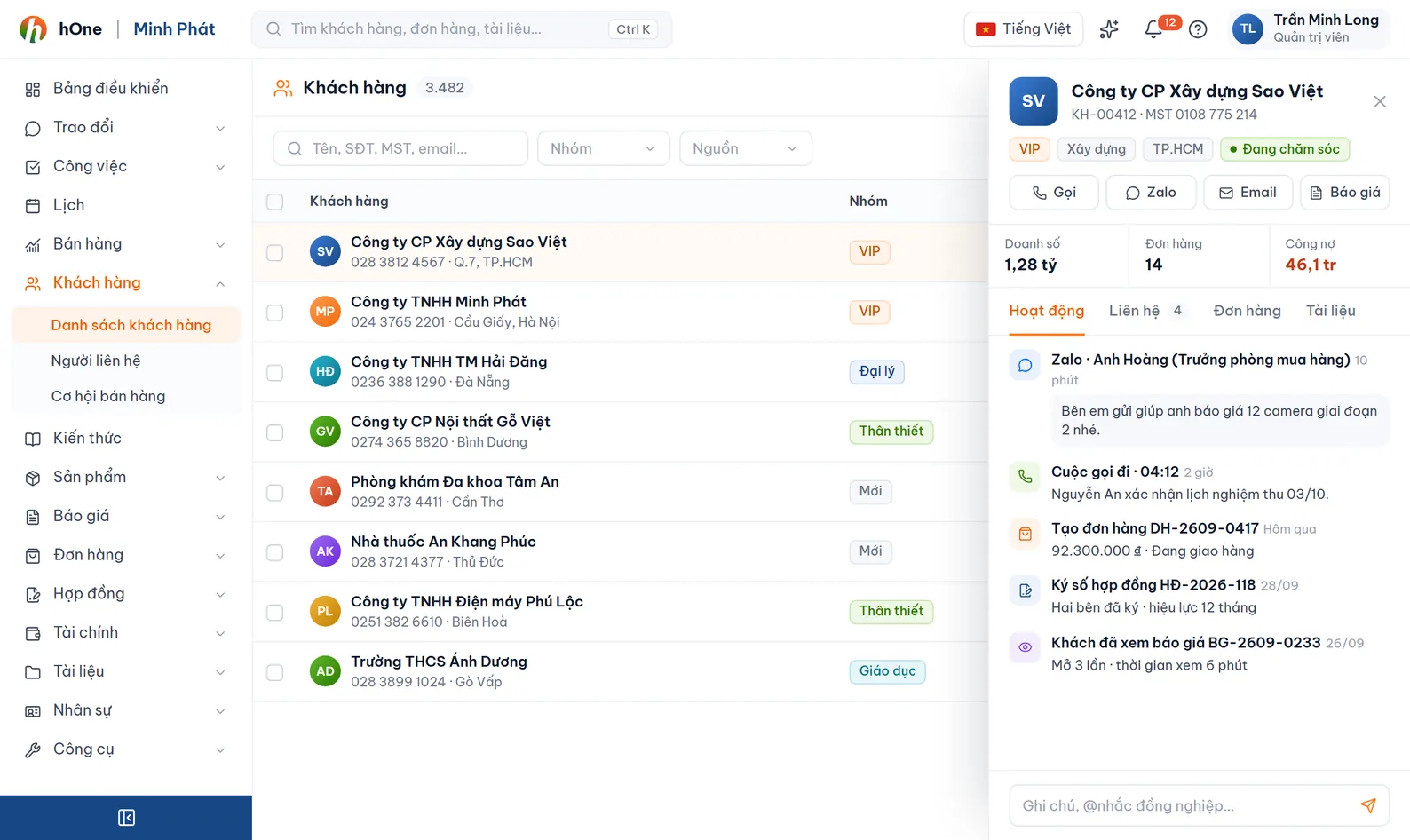
Search by name, code, tax ID, phone, email. Built-in views include My customers, New this week and Not bought in 90 days. Switch between Table, Kanban and Cards, and save your own filters.


Every customer has one profile: who owns it, who the contacts are, what they bought, which quotation is open, what was said in chat. When a salesperson leaves, the history stays with the company.
Customer lists sit in private Excel files, phone numbers in personal Zalo, quotation history in email. When someone leaves, the company loses the relationship too.
hOne keeps customers and contacts in one place. Each person sees the customers they own, were shared, or are within their permission scope. Orders, quotations, contracts, tasks and conversations attach to the profile automatically.
Search by name, code, tax ID, phone, email. Built-in views include My customers, New this week and Not bought in 90 days. Switch between Table, Kanban and Cards, and save your own filters.
The detail page has tabs for Overview, Orders, Quotations, Contracts, Tasks, Conversations, Payments, Contacts, Documents and History. A customer can have several owners, one of them primary.
Each customer has multiple contacts tagged with contact types you configure (primary, billing, shipping...). Parent companies and branches link in a hierarchy.
Create groups such as VIP or Dealer with a color, priority and a percent or fixed-amount discount. Add customers to a group one by one or in bulk from the list.
Download the template, fill it in, and press Validate to see bad rows before importing (up to 3,000 rows, 10MB). A row matching an existing code, or name plus tax ID, updates that customer instead of creating a new one.
When adding a customer, hOne warns on matches in the fields you pick, or blocks creation. The Find duplicates tool merges two profiles; orders, quotations and contracts move to the one you keep.
Share a customer with a colleague as View only or Can edit, with an expiry date. When someone changes role, Handover switches the owner; past revenue stays as it was.
Enter a tax ID on the company lookup page to get the company name, address, representative and industry. Results are saved for quick reuse.
Open Customer settings: customer types, contact types, statuses, industries, customer code rule (prefix, number length) and duplicate check.
Import your existing Excel or add customers one by one. hOne checks duplicates and assigns the owner.
Open a profile to see orders, quotations and conversations, create tasks and notes. Assign groups or change status in bulk.
The My customers overview shows quotations awaiting reply, contracts about to expire and customers who have not bought in over 90 days.
Minh moves to the projects team. Company ABC has a quotation waiting for a reply.
Not by default. Staff see customers they own, were shared, or are within their permission scope (for example team-level view). Administrators see everything.
Yes: .xlsx or .xls, up to 10MB and 3,000 rows per import, read from the first sheet. Press Validate first; rows with errors can be downloaded as a report to fix.
A soft delete can be restored. Permanent delete is administrator-only and cannot be undone.
hOne caches lookup results and refreshes from a public external source when needed. Data depends on that source, so verify before issuing an invoice.