Three ways to create
Create manually, create from confirmed payment vouchers, or get a draft created automatically when the customer fills in the invoice-info form after paying an order.


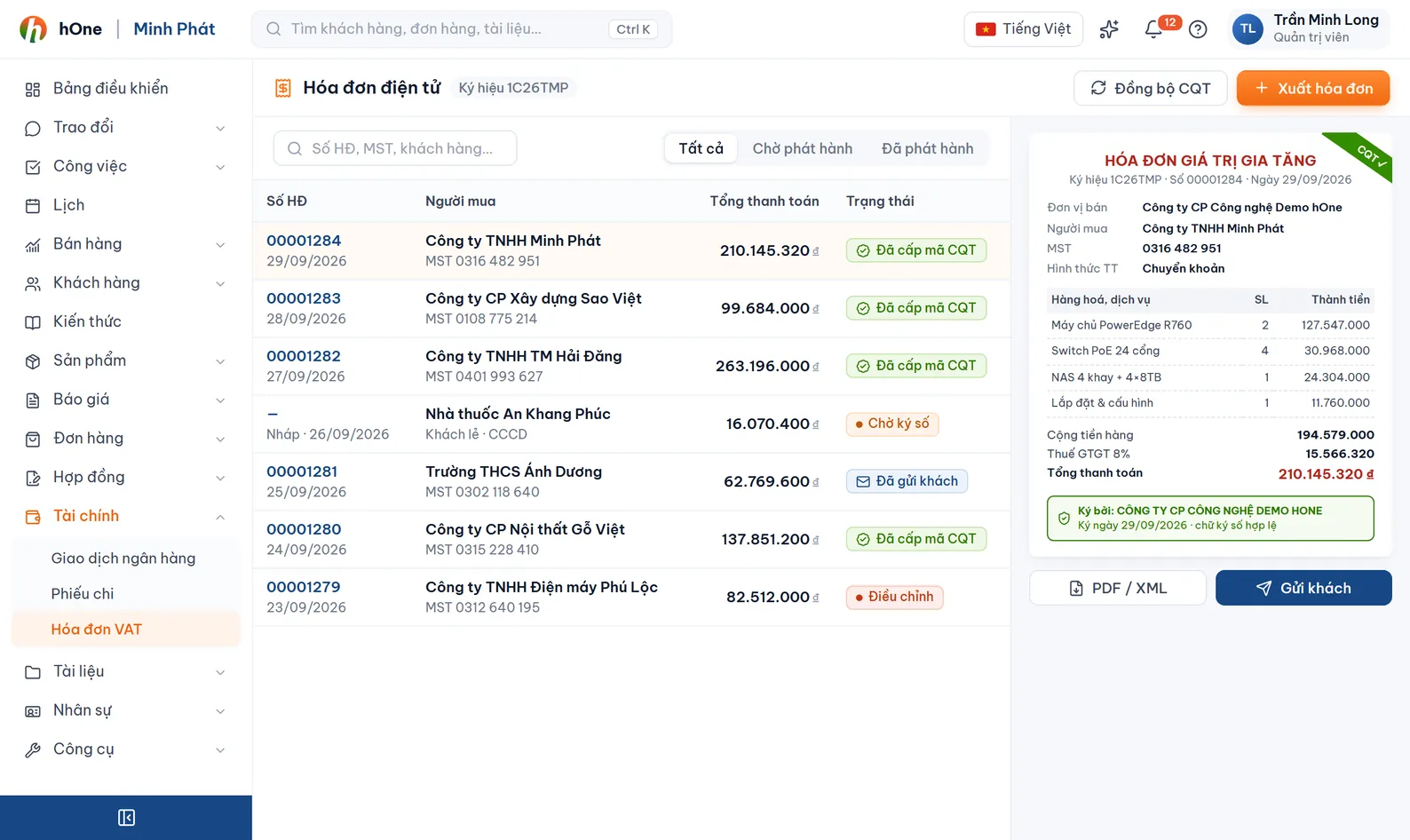
hOne connects with EasyInvoice (Softdreams). You create invoices from orders or receipt vouchers, sign and issue them from hOne, and issued invoices sync back so you can match them against orders, vouchers and incoming payments.
Accounting opens two systems: one for orders and collections, one for invoices. Buyer details are retyped each time, and invoices go out missing or late compared with the money received.
An invoice takes its data from the order or receipt voucher, hOne pushes the draft to EasyInvoice, you click Issue (sign) and the invoice is signed at the provider. Status, PDF and invoice number sync back to hOne.
Create manually, create from confirmed payment vouchers, or get a draft created automatically when the customer fills in the invoice-info form after paying an order.
Enter a tax code (10 digits, or 10-3 for a branch) and click search; hOne fills in the company name and address from public data.
Rewrite line names when an invoice is built from an order: match by contains, exact, starts with or regex, then replace, prepend/append, or merge several lines into one.
Save a draft to EasyInvoice, then Issue one invoice or many at once. A status can also auto-issue after some minutes or at a fixed time.
Sync up and down per invoice, or import by date range. Scheduled sync fetches the last 7 days and links customers by tax code.
Signed invoices can be Adjusted, Replaced or Cancelled (a reason is required). Replaced, Adjusted and Cancelled statuses are recorded.
Email signed invoices, optionally automatically after issue. View the signed PDF or download many at once.
On the e-invoice settings page pick EasyInvoice, enter the connection details, symbol and series, then test the connection.
From an order, from a voucher or by hand. Line items pass through the content rules before saving.
Review the draft and click Issue, or let the system issue on a schedule. The invoice number and signed PDF come back into hOne.
Email the invoice to the customer; link it to payment vouchers and the incoming transaction.
Công ty ABC transfers the order amount and accounting does not retype any customer data.
Today hOne connects with EasyInvoice (Softdreams). If you use another provider, get in touch and we will advise.
Invoices are signed and issued at EasyInvoice under that provider process; hOne stores the status, the PDF and the links to orders, vouchers and transactions.
Not directly. Use Adjust, Replace or Cancel; these need the publish permission.
Yes. Select several Draft or Pending-sign invoices and click Issue. Bulk signing cannot be undone, so hOne shows a warning first.
By default no: invoices created from the customer info form stay as drafts for accounting to review. If you set an auto-issue schedule on a status, they are issued at that time.