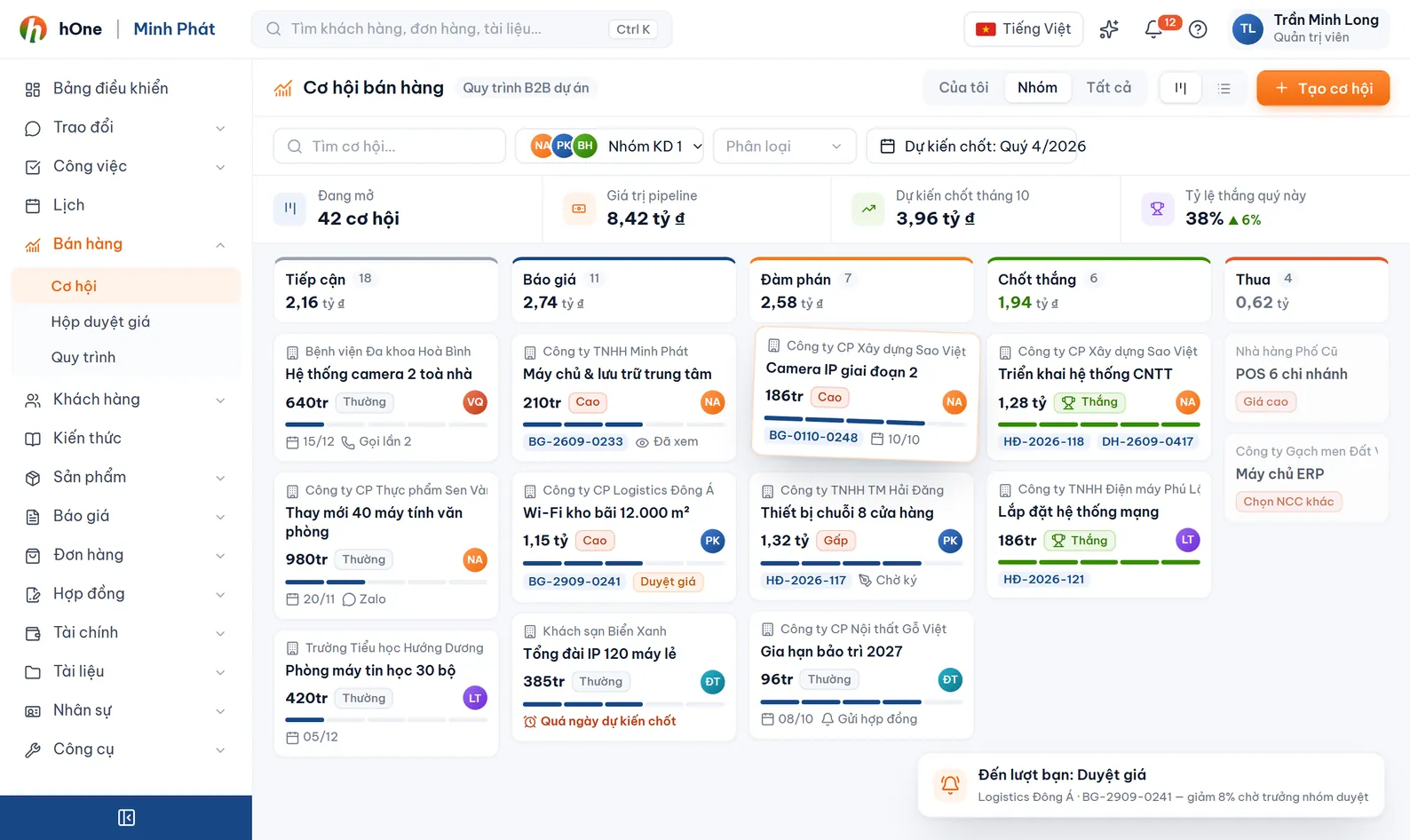
Opportunity board by step
Each column is a workflow step. Cards show name, value, days in step, an Overdue label and the owner. Filter Mine or All; change the step on the opportunity detail page.


A deal does not end at the quotation: there is still the order, stock issue, invoice and delivery. The hOne pipeline shows the whole company where each opportunity is stuck and which department holds it.
Sales finishes the quotation, then warehouse and accounting continue through chat messages and Excel files. When the customer asks for progress, nobody can answer with confidence.
An administrator builds the workflow (steps, branches, deadlines). Each sales track uses one workflow and its steps become the board columns. An opportunity runs step by step; a step assigned to a department drops its work into that department's queue.
Each column is a workflow step. Cards show name, value, days in step, an Overdue label and the owner. Filter Mine or All; change the step on the opportunity detail page.
Administrators set steps, branches, hour-based deadlines and win probability. A track's control level is Strict (blocks wrong order), Warning or Off.
Assign a receiving department to a step, such as Warehouse or Accounting. The Department queue page offers Accept, Assign to, Complete and Skip, plus required forms and checklists.
For each step, hide price, totals, discount, tax or cost from the assignee and that step's department. Hiding also applies to PDF print, Excel export and email.
The detail page lists the related quotations, orders, stock-issue notes and delivery notes, with print versions and attachments.
The Workflow overview shows opportunities per step, a revenue forecast weighted by step probability, win rate, loss reasons, the longest-stuck opportunities and each department's load.
The Price approval inbox gathers discount requests on quotations and orders for authorised people to approve or reject. The Sourcing page stores supplier price lists and quote requests.
Each salesperson sees collected revenue for the month, KPI progress and expected income under the sales pay policy assigned to them.
An administrator creates the workflow and steps, assigns departments, deadlines and price hiding where needed.
Each track is its own sales pipeline (New customers, Renewals...). Pick the workflow, members, and private or company-wide visibility.
Opportunities are created from quotations or manually and move through steps. A department step creates work for that department.
Watch overdue cards, use Nudge when needed, and read the forecast and loss reasons in the Workflow overview.
Example workflow: Quotation, Order, Stock issue, Invoice, Delivery.
No. The board is for viewing; completing, moving or skipping a step is done on the opportunity detail page, which is how the workflow keeps the order under control.
There are no hard-coded stages. Administrators define the steps in Workflow settings, so each company has its own workflow.
They see it read-only and handle their own department work. Completing or moving the opportunity's steps belongs to the opportunity owner.
The Completed and Cancelled or Lost columns show only those closed in the last 30 days by default. Press Show more closed or use search; administrators can change the number of days.
Opportunity value times the win probability you set on its current step, grouped by expected close month. Steps with no probability are not counted.